Gold Cura
Gold Cura Universal Dental Implant Driver Kit – 16 Prosthetic Drivers & Torque Ratchet
Out of stock
Couldn't load pickup availability
In stock. Estimated delivery within 4–5 working days.
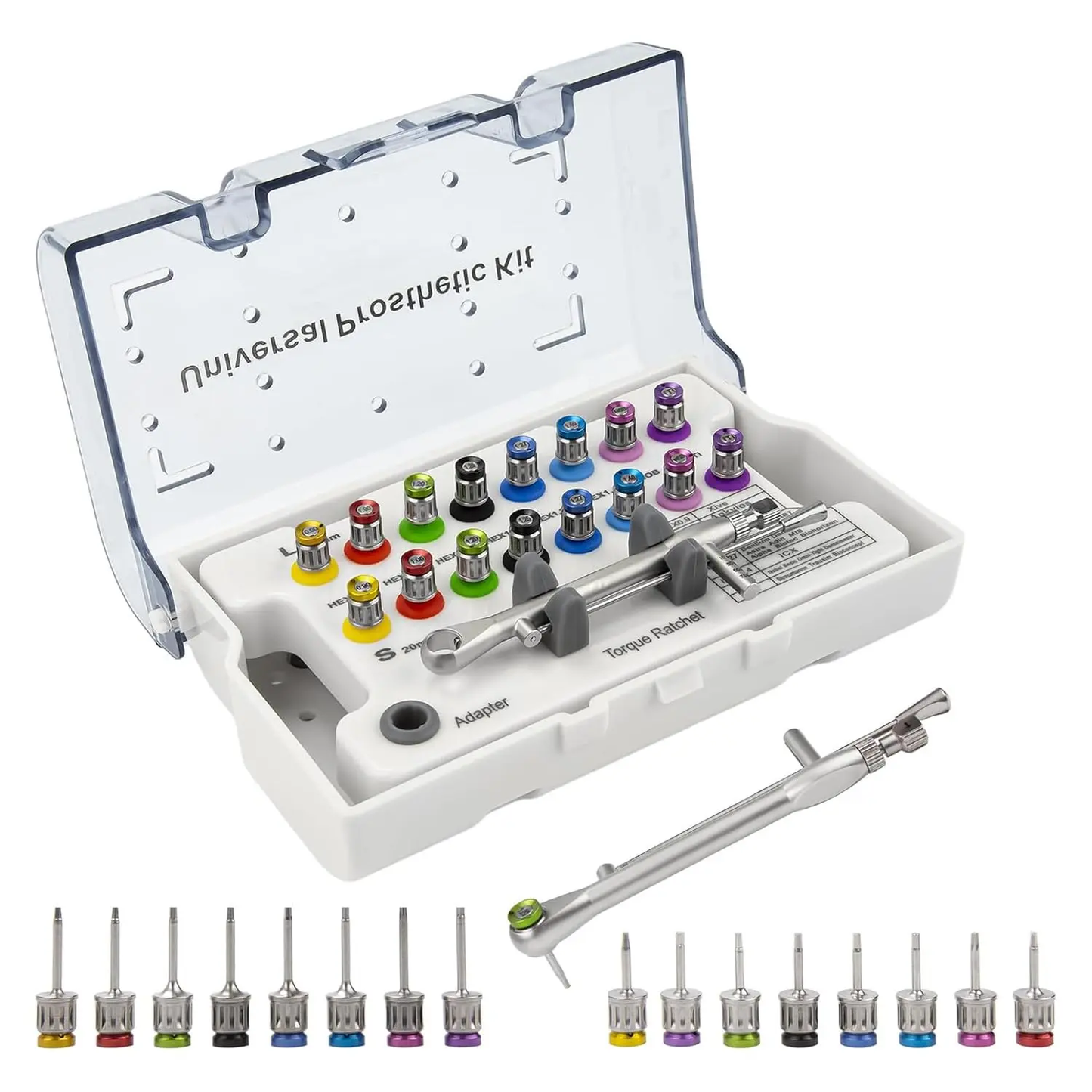
Quick Answer: The Gold Cura Universal Dental Implant Driver Kit is a multi-profile prosthetic screwdriver set with 16 colour-coded implant drivers —eight short and eight long—plus a torque ratchet, ratchet adapter and organised storage case. It includes Hex 0.9, 1.0, 1.2, 1.25, 1.27 and 1.4 mm driver sizes together with NOB and ITI profile labels for professional implant-restoration workflows. Exact screw fit and the required torque must always be confirmed from the implant system instructions before use.
Direct answer: The Gold Cura Universal Dental Implant Driver Kit is a multi-profile prosthetic screwdriver set with 16 colour-coded implant drivers—eight short and eight long—plus a torque ratchet, ratchet adapter and organised storage case. It includes Hex 0.9, 1.0, 1.2, 1.25, 1.27 and 1.4 mm driver sizes together with NOB and ITI profile labels for professional implant-restoration workflows. Exact screw fit and the required torque must always be confirmed from the implant system instructions before use.
Why Dentists Choose This Product
- Clearly defined configuration: The Gold Cura Universal Dental Implant Driver Kit is a multi-profile prosthetic screwdriver set with 16 colour-coded implant drivers —eight short and eight long—plus a torque ratchet, ratchet adapter and organised storage case. It includes Hex 0.9, 1.0, 1.2, 1.25, 1.27 and 1.4 mm driver sizes together with NOB and ITI profile labels for professional implant-restoration workflows. Exact screw fit and the required torque must always be confirmed from the implant system instructions before use.
- Compatibility guidance: Multi-profile kit with Hex 0.9, 1.0, 1.2, 1.25, 1.27 and 1.4 mm positions plus NOB and ITI labels. Universal does not mean every implant system; verify the exact prosthetic screw interface.
- Known package contents: 1 × Gold Cura Universal Dental Implant Driver Kit.
Universal Dental Implant Driver Kit: Key Facts
| Product category | Multi-profile implant prosthetic driver and screwdriver kit |
|---|---|
| Number of drivers | 16 colour-coded drivers |
| Configuration | 8 short drivers and 8 long drivers |
| Hex sizes | 0.9, 1.0, 1.2, 1.25, 1.27 and 1.4 mm |
| Additional profile labels | NOB and ITI |
| Included accessories | Torque ratchet, ratchet adapter and organised storage case |
| Typical application | Implant prosthetic restoration, abutment screw handling and prosthetic maintenance |
| Intended user | Trained dental professionals |
What Is Included in the Implant Prosthetic Kit?
- 8 short implant prosthetic drivers
- 8 long implant prosthetic drivers
- 1 torque ratchet
- 1 ratchet adapter
- 1 organised protective storage case
The colour-coded arrangement is designed to make the driver profiles easier to identify and return to their assigned positions after use.
Implant Driver Size and Profile Guide
| Profile or size | Short driver | Long driver | Selection note |
|---|---|---|---|
| Hex 0.9 mm | Included | Included | Select only after confirming the prosthetic screw interface. |
| Hex 1.0 mm | Included | Included | Confirm stable seating before applying torque. |
| Hex 1.2 mm | Included | Included | Use only where the implant-system instructions specify the matching driver. |
| Hex 1.25 mm | Included | Included | Do not substitute for a nearby size if engagement is loose or incomplete. |
| Hex 1.27 mm | Included | Included | Verify the exact screw connection; small dimensional differences matter. |
| Hex 1.4 mm | Included | Included | Confirm passive, complete engagement before use. |
| NOB profile label | Included | Included | A profile label within this kit, not a guarantee of compatibility with every implant system or brand. |
| ITI profile label | Included | Included | A profile label within this kit; confirm the actual screw and system instructions. |
Short vs Long Implant Drivers
| Driver format | Typical selection | Important consideration |
|---|---|---|
| Short implant driver | May be selected where vertical access is limited or a more compact working length is appropriate. | Visibility, seating and instrument control must remain adequate. |
| Long implant driver | May be selected for deeper or recessed prosthetic access where the longer working length is appropriate. | Avoid off-axis loading and confirm complete engagement before turning. |
The correct format depends on access, restoration design and the specific prosthetic screw. Length alone does not determine compatibility.
Common Implant Prosthetic Uses
- Placement and removal of suitable implant abutment screws
- Implant crown and bridge delivery
- Prosthetic screw maintenance and retrieval
- Chairside implant-restoration procedures
- Multi-system or backup prosthetic workflows where the exact driver fit is verified
How to Select the Correct Implant Driver
- Identify the implant and prosthetic system. Check the implant record, component packaging or manufacturer documentation.
- Confirm the screw interface. Match the required profile and dimension rather than selecting by appearance alone.
- Test seating without force. The driver should engage fully and remain stable without excessive play or binding.
- Stop if the fit is uncertain. Do not force a loose, tilted, partially seated or binding driver.
- Use the specified torque. Follow the implant or component manufacturer’s torque instruction instead of applying one generic value to every system.
Universal Implant Driver Kit vs System-Specific Driver
| Feature | Gold Cura multi-profile kit | System-specific driver |
|---|---|---|
| Profile selection | Multiple commonly used sizes and profile labels in one organised kit | Defined for a particular manufacturer, component or screw interface |
| Typical role | Mixed prosthetic workflows, chairside organisation and backup availability | Known implant system with documented compatibility |
| Fit confirmation | Must be checked for every screw and system | Still verify the correct component and driver reference |
| Torque selection | Use the implant-system or component instructions | Use the implant-system or component instructions |
What Does “Universal” Mean?
In this listing, universal means that the case contains a broad range of implant-driver sizes and profile labels. It does not mean that one driver fits every implant brand, abutment, prosthetic screw or connection. Implant systems can use visually similar but dimensionally different screw interfaces. Always verify compatibility before ordering and again before clinical use.
Torque Ratchet Guidance
The included torque ratchet supports controlled prosthetic tightening when used with the correct driver and adapter. The required torque is determined by the implant, abutment, prosthetic screw and manufacturer instructions. This page intentionally does not give one universal torque value because an incorrect setting can damage the screw, component, restoration or implant connection.
Cleaning, Processing and Inspection
- Follow the instructions supplied with the kit and the implant-system protocol.
- Do not assume a sterilisation cycle, reprocessing limit or material specification that is not stated in the supplied instructions.
- Inspect the driver tip, shaft, ratchet connection and adapter before every use.
- Do not use a worn, rounded, corroded, loose, cracked, bent or damaged component.
- Keep the drivers organised in the case so the selected profile can be checked before use.
Delivery and Returns
- Estimated delivery: 4–5 working days.
- Returns: Eligible return requests must be raised within 24 hours of delivery, subject to Gold Cura’s return policy.
- Clinical-use restriction: Used, contaminated, opened hygiene-sensitive or sterilized products cannot be returned.
Frequently Asked Questions
What is a universal dental implant driver kit?
It is a multi-profile implant prosthetic screwdriver set containing several driver dimensions and formats in one case. “Universal” describes the breadth of the kit and does not guarantee compatibility with every implant system.
How many drivers are included?
The kit includes 16 colour-coded drivers: eight short and eight long.
Which implant driver sizes are included?
The kit contains Hex 0.9, 1.0, 1.2, 1.25, 1.27 and 1.4 mm drivers, plus NOB and ITI profile labels. Each is supplied in a short and long format.
Why are both short and long implant drivers included?
The two working lengths help clinicians select a suitable format for different access conditions. The exact choice depends on restoration design, visibility, seating and control.
Is the kit compatible with every implant brand?
No universal kit should be assumed to fit every implant brand or component. Confirm the exact prosthetic screw interface and manufacturer documentation before use.
What do the NOB and ITI labels mean?
They identify profile positions supplied within this kit. The labels alone are not a guarantee that the driver fits every product associated with a similarly named system.
Does the kit include a torque wrench or ratchet?
Yes. The set includes a torque ratchet and a ratchet adapter.
What torque setting should be used?
Use the value specified by the implant, abutment or prosthetic-component manufacturer. There is no single torque setting that is correct for every system.
Can the kit be sterilised?
Use only the cleaning, disinfection, sterilisation and reprocessing instructions supplied with the product. Do not assume a standard cycle without checking those instructions.
What should I do if the driver feels loose or does not seat fully?
Stop and do not apply torque. Reconfirm the screw interface, driver size and system documentation, then select the correct driver.
Implant Driver Selection Guide
Read the implant driver sizes, compatibility and torque-selection buying guide.
Related Gold Cura Implant and Prosthetic Products
- Gold Cura Implant Impression Trays
- ICP PEEK Implant Cleaning Tip
- Gold Cura Dental Degranulation Kit
- Gold Cura Digital Shade Guide
- View Dental Equipment for Clinics
Professional-use dental instrument. Confirm the exact driver fit, manufacturer torque instruction and supplied processing guidance before clinical use.